
Depositing Funds
To start trading on Gambit, you need to deposit USDC into your Deposit Wallet. Deposits happen on-chain, meaning you send USDC from your connected wallet to the platform's deposit address.
Before You Begin
Make sure you have:
- A connected Web3 wallet with USDC balance
- Enough native tokens (ETH on Arbitrum) to cover gas fees
- Your wallet is on a supported network (Arbitrum)
Step-by-Step: Making a Deposit
Open the Deposit Modal
Select Deposit from the header on prediction page or portfolio page.
Enter Your Amount
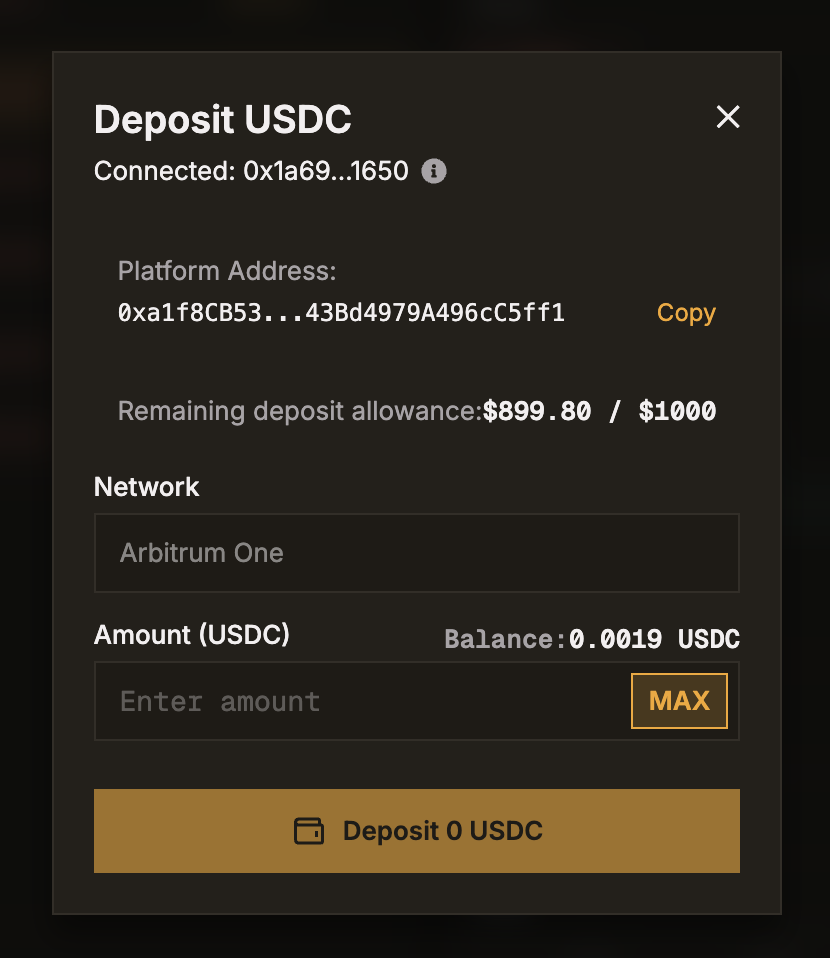
Type the amount of USDC you want to deposit. The modal shows your current on-chain USDC balance for reference.
Confirm the Transaction
Click Deposit. Your wallet will prompt you to approve the USDC transfer. This is a real on-chain transaction and requires gas fees.
Wait for Confirmation
After you submit the transaction, the platform waits for blockchain confirmations before crediting your Deposit Wallet:
| Deposit Size | Confirmations Required | Est Time |
|---|---|---|
| Under $100,000 | 12 confirmations | ~2 minutes |
| Under $500,000 | 24 confirmations | ~4 minutes |
| Under $1,000,000 | 36 confirmations | ~6 minutes |
| Any higher | 48 confirmations | ~8 minutes |
For security, we wait for a higher block count to ensure the batch has been successfully posted to Ethereum (L1). If your deposit is not credited within 60 minutes, please contact support for a manual status check.
Funds Arrive in Deposit Wallet
Once confirmed, your Deposit Wallet balance updates automatically. You'll see the deposit reflected in your funding history.
Important Details
- Minimum deposit: No minimum (though gas fees apply)
- Maximum single deposit: $1,000 USDC
- Currency: USDC only
- Destination: Funds always arrive in your Deposit Wallet
- To trade: After depositing, you must transfer funds to your Trading Wallet
Always double-check that you are sending USDC on a supported network. Sending the wrong token or using the wrong network may result in permanent loss of funds.
Tracking Your Deposits
All deposits are recorded in your Funding History tab on the Portfolio page. Each entry shows:
- Amount deposited
- Transaction hash (clickable link to block explorer)
- Timestamp
- Status (pending, confirmed)
