
Fees & Fee Tiers
Gambit charges trading fees on every order. This page explains how fees are calculated, the difference between taker and maker fees, and how fee tiers work.
How Fees Are Calculated
Fees on Gambit are calculated on the quantity of contracts, not on the total order value.
Fee = Quantity x Fee Rate
The fee is charged on the number of contracts, not on the order value (quantity multiplied by price). This is a key distinction.
Example
You buy 100 contracts at $0.50 each with a 2% taker fee rate:
| Calculation | Value |
|---|---|
| Order value | 100 x $0.50 = $50.00 |
| Fee | 100 x 0.02 = $2.00 |
| Total cost | $50.00 + $2.00 = $52.00 |
Notice the fee is $2.00 (2% of the 100-contract quantity), not $1.00 (2% of the $50 order value).
Taker Fee vs. Maker Fee
Taker Fee
Charged when your order removes liquidity from the order book (i.e., it matches against an existing order).
- Applied to: Market Limit orders
- Applied to: Limit orders that fill immediately (unless Post Only is enabled)
- Typically higher than the maker fee
Maker Fee
Charged when your order adds liquidity to the order book (i.e., it sits on the book waiting for someone else to match it).
- Applied to: Limit orders that don't fill immediately
- Applied to: Post Only orders (guaranteed maker)
- Typically lower than the taker fee
Which Fee Will I Pay?
| Order Type | Time in Force | Post Only | Fee |
|---|---|---|---|
| Market Limit | IOC | N/A | Taker fee |
| Limit | GTC | No | Maker fee (if it rests on the book) |
| Limit | GTC | Yes | Maker fee (guaranteed) |
| Limit | IOC | No | Taker fee (if it fills immediately) |
| Any | Any | N/A, Reduce Only enabled | Max of taker/maker fee |
Platform will reserve the higher of the taker/maker fee and refund any excess upon order fulfillment.
Where to See Your Fee Rates
Your current fee rates are displayed in the Account Overview panel on the trading page:
- Taker Fee: Shown as a percentage (e.g., 2.00%)
- Maker Fee: Shown as a percentage (e.g., 1.50%)
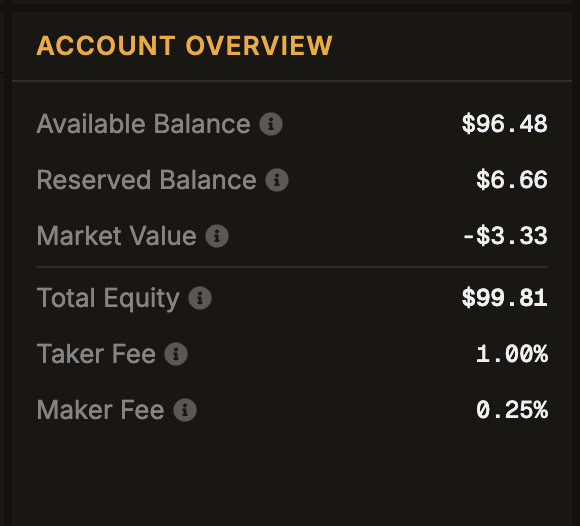
Hover over the info icons next to each fee to see a tooltip explaining how that fee is applied.
Fee Tiers
Fee tier thresholds and rates are set by the platform and may be adjusted over time. When your tier changes, you'll receive a real-time update, and your Account Overview will reflect the new rates immediately.
Fees on Buy vs. Sell
Fees are calculated the same way for both buy and sell orders. The fee is always based on the quantity of contracts traded.
Buy Order Total Cost
Total = (Quantity x Limit Price) + (Quantity x Fee Rate)
Sell Order Total Cost
For sell orders, the fee is deducted from (or added to) the reserved balance:
Total = Quantity + (Quantity x Fee Rate)
The Buy and Sell buttons on the order form always show the estimated total cost and fee before you submit, so you can review before confirming.
Withdrawal Fee
Separate from trading fees, a flat $3 USDC fee is charged on every withdrawal from the platform. See Withdrawing Funds for details.