
Depositing into Vaults
vault is run by the vault leader who places orders for the entire vault. The performance is split pro-rata across all depositors from the time of deposit. Depositing into a vault carries risk and may result in you losing your entire deposit.
How Vaults Work
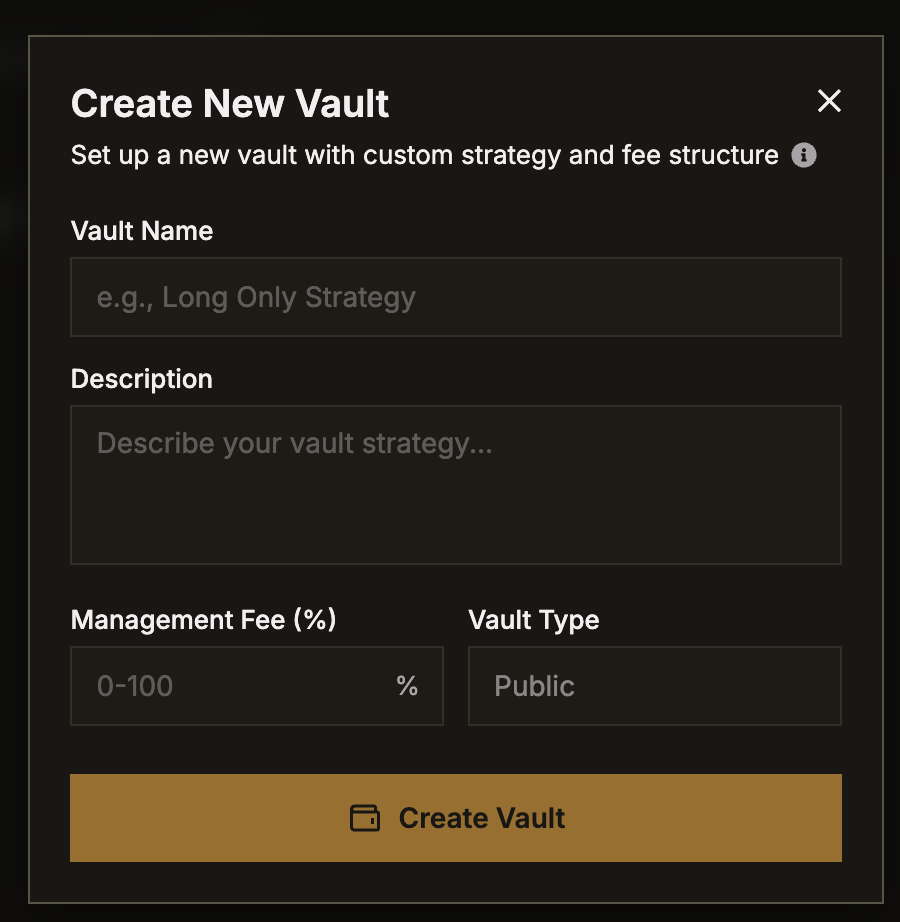
- A vault leader creates a vault with a defined strategy and fee structure via My Vault page
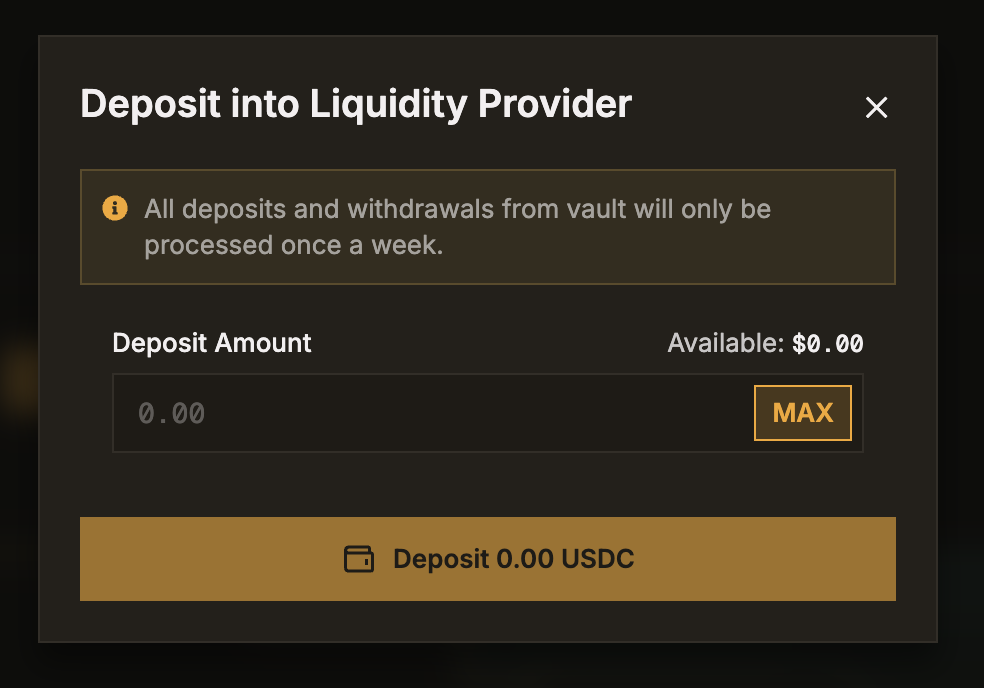
- Depositors deposit USDC into the vault (processed weekly)
- The vault leader places orders with the assets in the vault
- Profits and losses are distributed proportionally based on each depositor's share
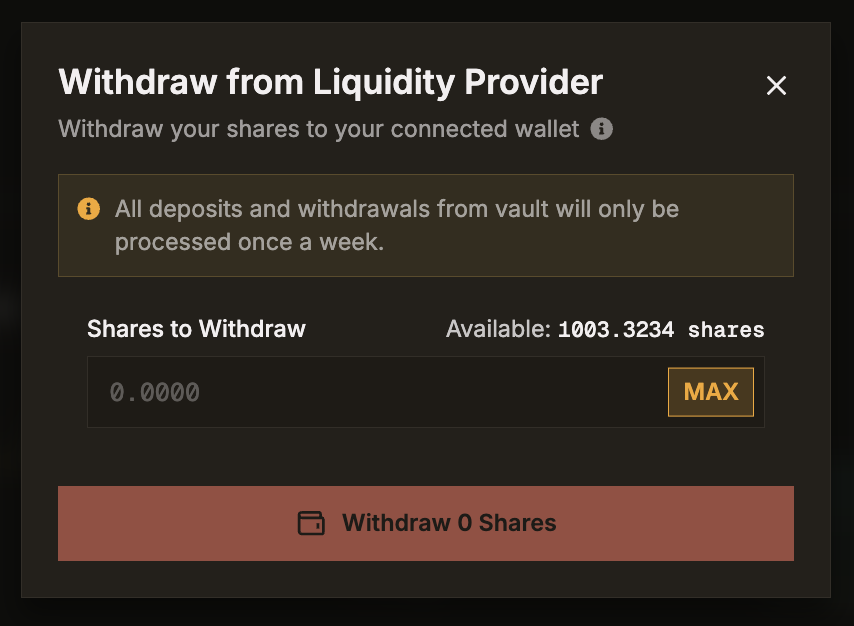
- Depositors can request for a withdrawal at any time. However, vault withdrawals will only be processed on a weekly basis typically post the expiry of the nearest dated predictions. This is as the Vault assets may be tied up in positions.
Key Concepts
Units
When you deposit into a vault, you receive units proportional to your deposit. Units represent your proportional portion of the vault's total value.
Price Per Unit = Total Vault Value / Total Units Outstanding
As the vault's value grows through profitable trading, the price per unit increases, meaning your units are worth more.
Total Value Locked (TVL)
The total amount of value deposited across all depositors in the vault.
Vault Fee
A performance fee charged by the vault leader, displayed as a percentage. This fee is taken from the vault's profits.
Leader Margin
The maintenance requirement that the vault leader must maintain, shown as a percentage. This ensures that the leader has skin in the game and to deter them from exploiting their leader status.
Browsing Vaults
Navigate to the Vaults page from the main navigation to see all available vaults.
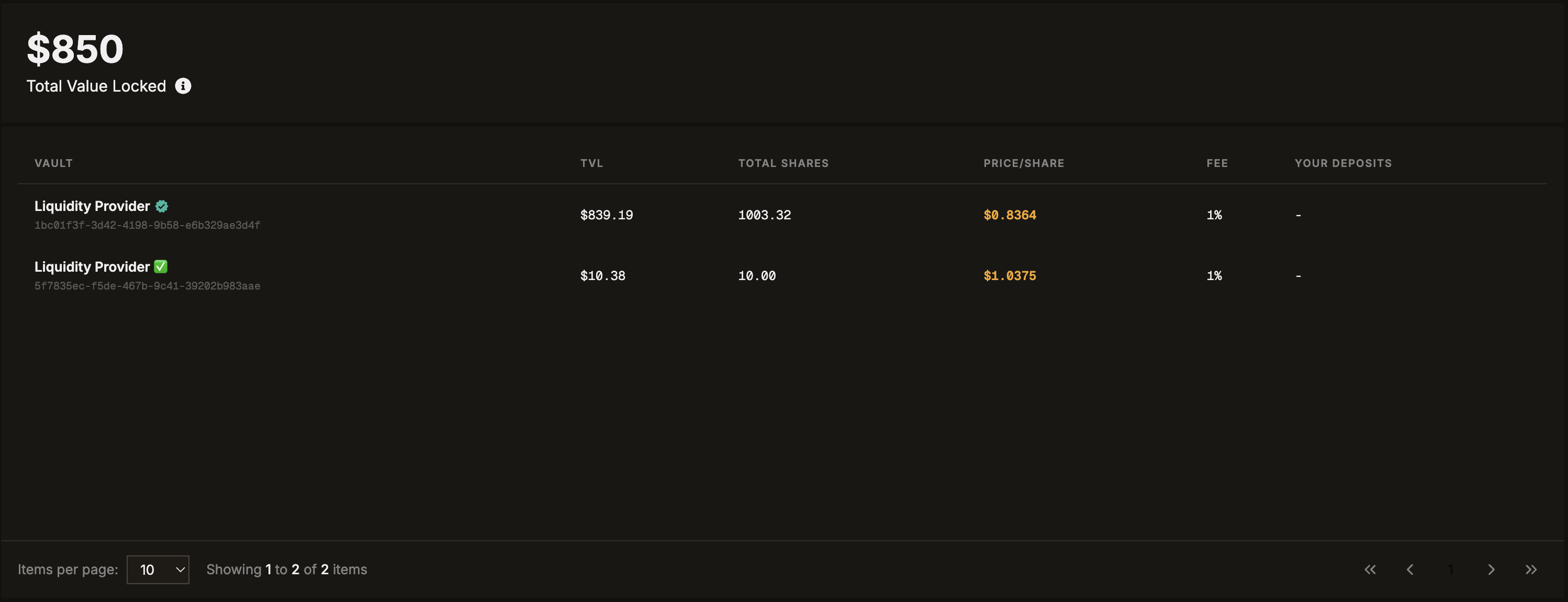
The vaults table shows:
| Column | What It Means |
|---|---|
| Vault | The name of the vault and its ID |
| TVL | Total Value - how much capital is in the vault |
| Total Units | Total units outstanding |
| Price/Unit | Current price per unit |
| Fee | The percentage of profits taken by the vault leader as a management fee |
| Your Deposit | How much you've deposited (if any) |
Click on any vault to view its detailed page.
Vault Detail Page
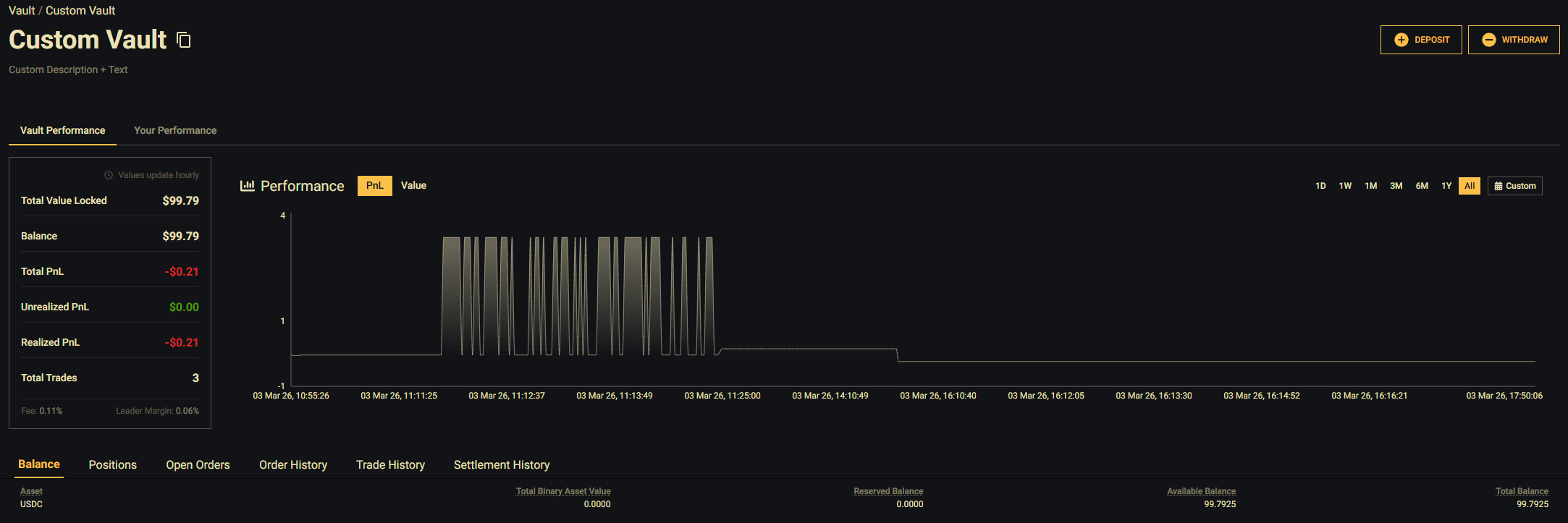
The vault detail page shows comprehensive information:
Vault Stats
| Metric | Meaning |
|---|---|
| Total Value Locked | Total capital in the vault |
| Total PnL | Overall profit/loss since inception |
| Unrealized PnL | P&L from positions still open |
| Realized PnL | P&L from closed positions |
| Total Trades | Number of trades executed |
| Fee | The percentage of profits taken by the vault leader as a management fee |
| Leader Margin | The minimum balance the vault leader must maintain, calculated as a percentage of the fee |
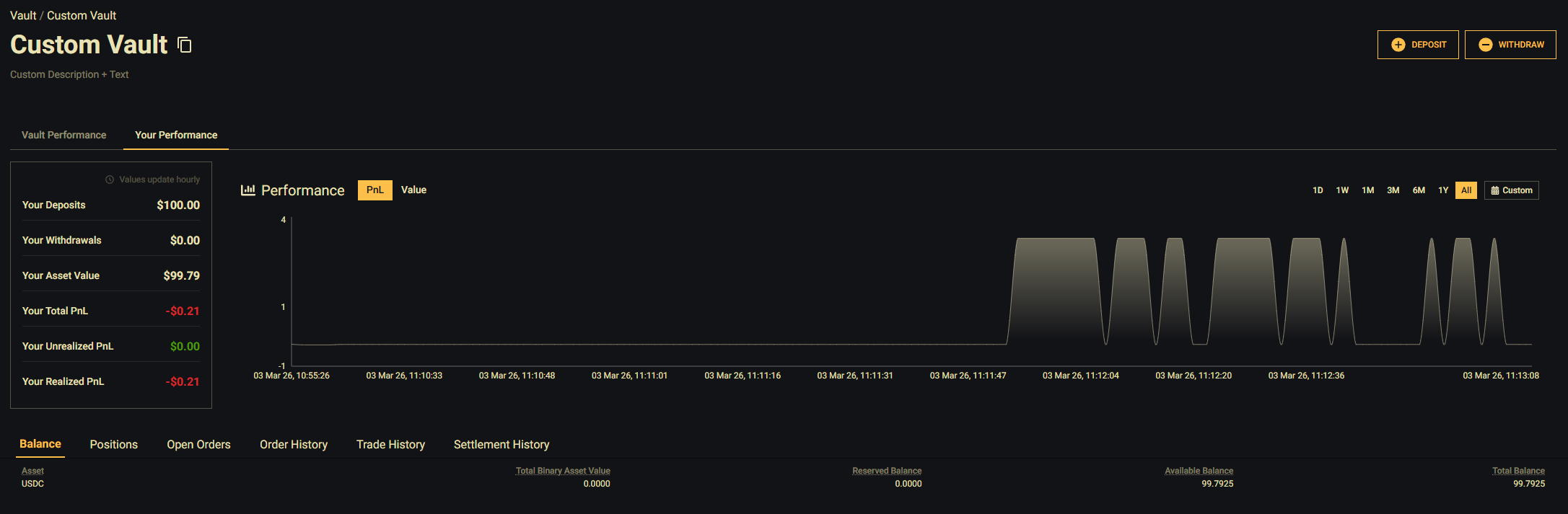
Your Stats (When Active)
| Metric | Meaning |
|---|---|
| Your Deposits | Total amount you've deposited |
| Your Withdrawals | Total amount you've withdrawn |
| Your Asset Value | Current value of your units |
| Your Total PnL | Your personal profit/loss |
| Your Unrealized PnL | Your P&L from open positions |
| Your Realized PnL | Your P&L from closed positions |
Values update hourly. A notice at the top of the stats card indicates this.
Depositing into a Vault
Prerequisites
- You must have funds in your Vault Wallet (transfer from Deposit Wallet if needed)
- Minimum deposit: 100 USDC
Steps
Navigate to the Vault
Navigate to the vault's detail page.
Click Deposit
Click Deposit to open the deposit modal.
Enter Amount
Enter the amount you want to deposit (minimum 100 USDC).
Confirm
Click Confirm to submit your deposit request.
All vault deposits are processed once per week. Your deposit will appear as a pending request until the next weekly processing cycle.
After Depositing
- Your deposit appears in the Open Requests tab as "Pending"
- During the weekly processing, the deposit is converted to vault units
- Once processed, you'll see your units in the Positions tab
- You can cancel a pending deposit request before it's processed
Withdrawing from a Vault
Withdrawals are made by units, not by dollar amount.
Navigate to the Vault
Navigate to the vault's detail page.
Click Withdraw
Click Withdraw to open the withdrawal modal.
Enter Units
Enter the number of units you want to withdraw.
Confirm
Click Confirm to submit your withdrawal request.
All vault withdrawals are processed once per week, just like deposits. Your withdrawal request will be pending until the next processing cycle.
After Withdrawing
- Your withdrawal appears in the Open Requests tab as "Pending"
- During weekly processing, your units are converted to USDC at the current unit price
- The USDC is credited to your Vault Wallet
- From there, you can transfer to your Deposit Wallet and withdraw to the blockchain
Tracking Your Vault Deposits
Vault Detail Page
On any vault's detail page, you can monitor the vault's trading activity through these tabs:
| Tab | What It Shows |
|---|---|
| Balance | The vault's current wallet balances |
| Positions | The vault's open trading positions |
| Open Orders | The vault leader's open orders |
| Order History | All orders placed by the vault leader |
| Trade History | All executed trades within the vault |
| Settlement History | Settled contracts and final outcomes |
Your personal vault deposit details (units held, deposits, withdrawals, P&L) are shown in the Your Stats section of the vault stats card.
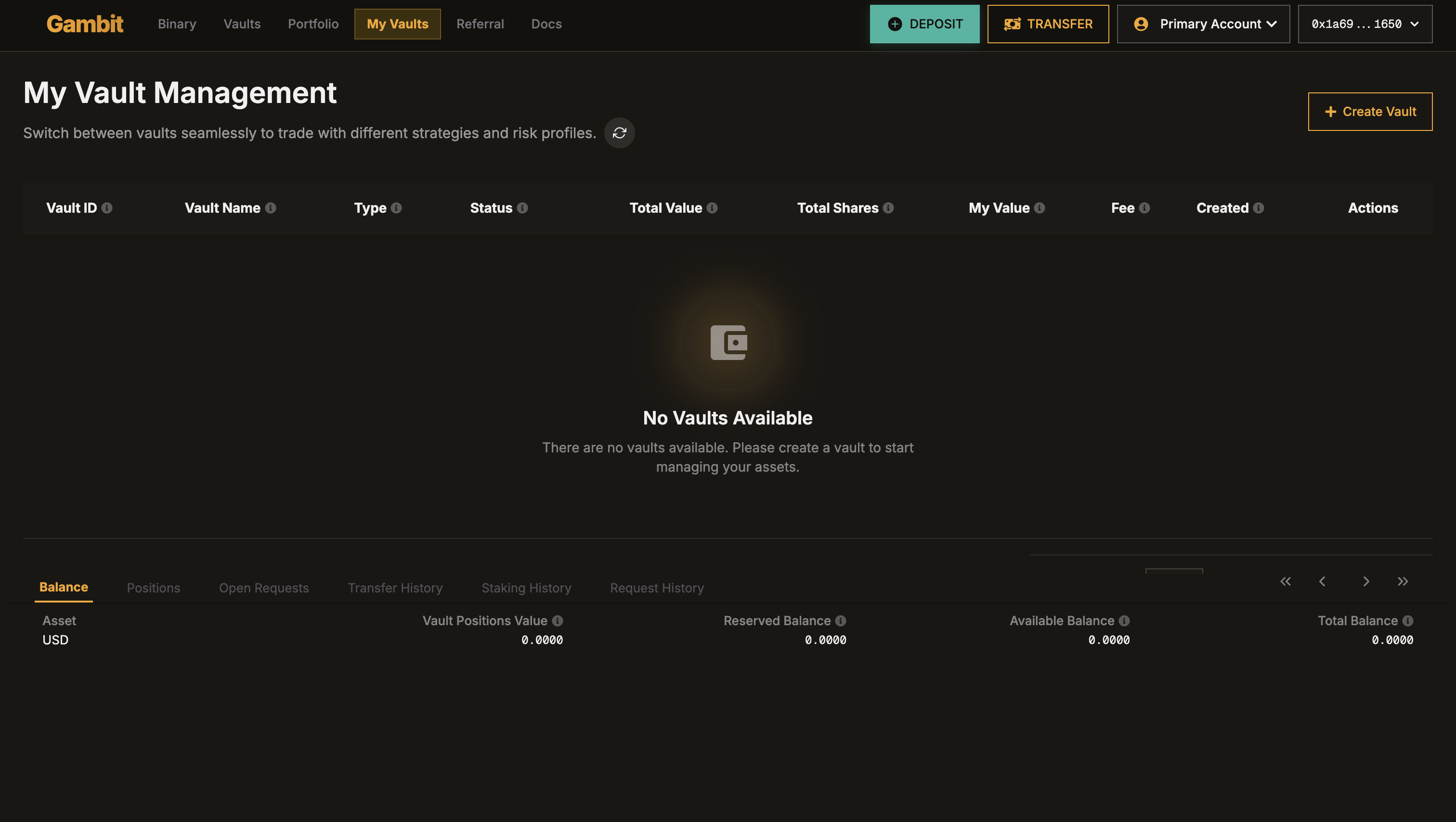
My Vaults Page (For Vault Leaders)
The My Vaults page is for users who want to create and manage their own vaults. This is not where depositors track their deposits.
From this page, vault leaders can:
- Create a new vault for other users to deposit into
- View and manage their existing vaults
Calculating Your Returns
The platform tracks three types of PnL for your vault deposit:
| PnL Type | What It Means |
|---|---|
| Unrealized PnL | Gain or loss on units you still hold, based on the current unit price |
| Realized PnL | Gain or loss on units you've already withdrawn |
| Total PnL | Unrealized + Realized combined |
Unrealized PnL
Your unrealized PnL reflects what you would gain or lose if you withdrew all your remaining units at the current price:
Current Position Value = Your Units x Current Price Per Unit
Unrealized PnL         = Current Position Value - Cost of Remaining Units
This value updates hourly as the vault's unit price changes.
Realized PnL
When you withdraw units, the gain or loss on that withdrawal is locked in as realized PnL:
Withdrawal Proceeds = Units Withdrawn x Unit Price at Settlement - Leader Fees
Realized PnL        = Withdrawal Proceeds - Cost Attributed to Those Units
The vault leader's performance fee is calculated with respect to the number of units withdrawn and not on the total value. [Fee % x Qty Withdrawn]
How Units Work Across Multiple Deposits
When you deposit multiple times at different unit prices, all your units are pooled together. The platform tracks your cumulative totals (total deposited, total withdrawn, total fees paid) rather than the cost basis of each individual deposit.
Example with multiple deposits and a partial withdrawal:
- Week 1: You deposit $1,000 when units are priced at $1.00. You receive 1,000 units.
- Week 2: You deposit another $1,000 when units are priced at $1.50. You receive ~666.67 units. You now hold 1,666.67 units with $2,000 total deposited.
- Week 3: You withdraw 1,000 units. At settlement, units are priced at $1.60. You receive 1,000 x $1.60 = $1,600 (minus the vault leader's performance fee).
After the withdrawal settles:
- Realized PnL: Captured from the 1,000 units you withdrew
- Unrealized PnL: 666.67 remaining units x $1.60 = $1,066.67, compared against what you effectively have left deposited
- Total PnL: Realized + Unrealized combined
Withdrawal Settlement
When you withdraw units, the amount you receive is based on the current unit price at the time of weekly settlement, not the price at which you originally deposited:
Withdrawal Amount = Units Withdrawn x Unit Price at Settlement - Vault Leader Fee
Important Considerations
- Weekly processing: Deposits and withdrawals are only processed once a week. Plan ahead.
- No instant access: Unlike trading, you can't instantly withdraw vault deposits.
- Performance varies: Past performance doesn't guarantee future results. Vault leaders trade at their discretion.
- Fees apply: The vault leader charges a performance fee on profits.
- Cancellable: You can cancel pending requests before weekly processing occurs.