
Transferring Between Wallets
Transfers let you move funds between your three wallets: Deposit, Trading, and Vault. Transfers are instant and free.
Why Transfer?
Each wallet serves a different purpose:
| From | To | Why |
|---|---|---|
| Deposit Wallet | Trading Wallet | To start trading predictions |
| Deposit Wallet | Vault Wallet | To start depositing into vaults |
| Trading Wallet | Deposit Wallet | To make funds available for withdrawal |
| Vault Wallet | Deposit Wallet | To make funds available for withdrawal |
You can only deposit to and withdraw from the Deposit Wallet. So if you want to withdraw trading profits, first transfer from your Trading Wallet to your Deposit Wallet.
Step-by-Step: Transferring Funds
Open the Transfer Modal
You can open the transfer modal in two ways:
- Click the header and select Transfer
- If your Trading Wallet is empty, click the Transfer button in the Account Overview panel
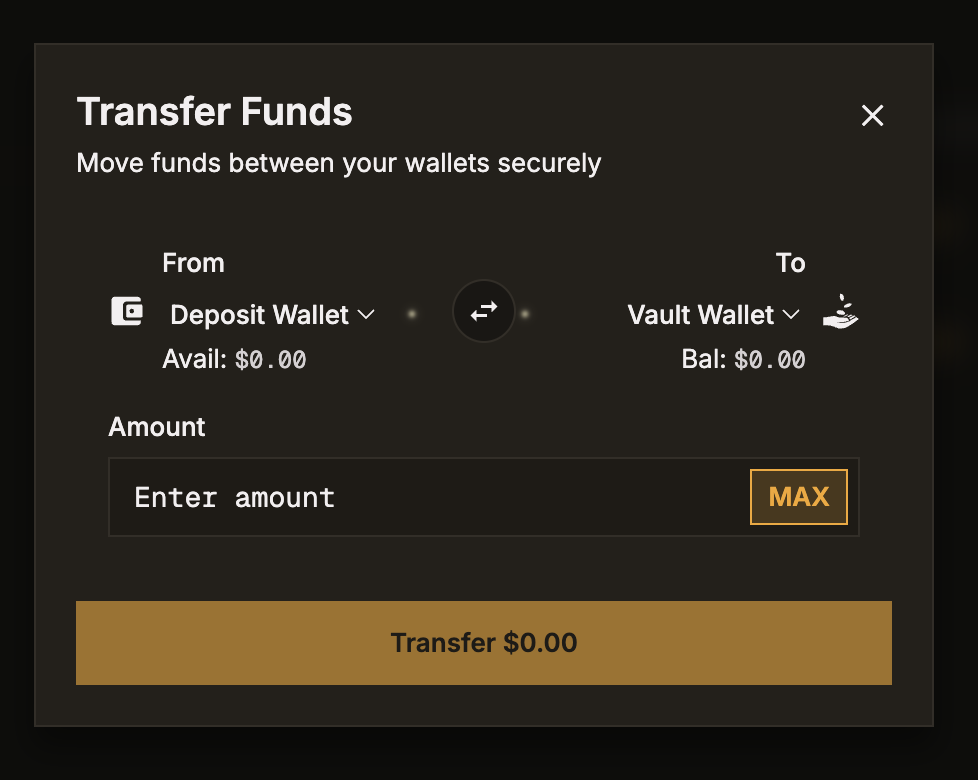
Select Source and Destination
Use the dropdowns to choose which wallets you're transferring between:
- From: Deposit Wallet, Trading Wallet, or Vault Wallet
- To: Deposit Wallet, Trading Wallet, or Vault Wallet
Enter the Amount
Type the amount to transfer. Your available balance in the source wallet is shown.
Confirm the Transfer
Click Transfer. The funds move instantly between your wallets. Both wallet balances update in real-time.
Important Details
- Cost: Free. No fees for internal transfers.
- Speed: Instant. Balances update immediately.
- Limits: You can only transfer your available balance. Reserved funds (locked in orders or positions) cannot be transferred.
- Direction: You can transfer between any two wallets in either direction.
Common Transfer Scenarios
"I just deposited and want to trade"
Transfer from Deposit Wallet to Trading Wallet, then head to the Prediction trading page.
"I want to withdraw my trading profits"
Transfer from Trading Wallet to Deposit Wallet, then initiate a withdrawal.
"I want to deposit into a vault"
Transfer from Deposit Wallet to Vault Wallet, then go to the Vaults page to deposit into a vault.
"I want to cash out my vault deposit"
Withdraw from the vault first (processed weekly), then transfer from Vault Wallet to Deposit Wallet, and finally withdraw to your external wallet.